

Taking gifts and tickets through Zeffy
Stripe takes your gifts and tickets by default. If your organisation is a charity or non-profit you can use Zeffy instead for gifts and for the events you choose. Zeffy takes the payment on its own page for no fee, and asks the person paying whether they'd like to add an optional tip to Zeffy. You decide per kind of payment, and you can switch back at any time.
What changes for the person paying
- They press Give or a ticket's Pay button in your app as usual. The page that opens is a short note from your app, then they go to your Zeffy form to choose the amount, how often, and whether to add Gift Aid.
- The note says that Zeffy processes the payment free of charge for you and will ask for an optional tip to Zeffy. The tip goes to Zeffy, never to you. People who aren't told about it tend to blame the organisation, so the note says it first.
- The apps need no update: giving and tickets already open this page.

Who can use it
Zeffy serves charities and non-profits with a bank account in the organisation's name. A charity number is not required by Zeffy for UK organisations, which suits excepted charities (many small churches are). When you choose Zeffy the portal asks you to confirm that your organisation is a charity or non-profit. Zeffy is offered to every organisation, and recommended to church apps.
What can go through Zeffy
| Kind of payment | Choices |
|---|---|
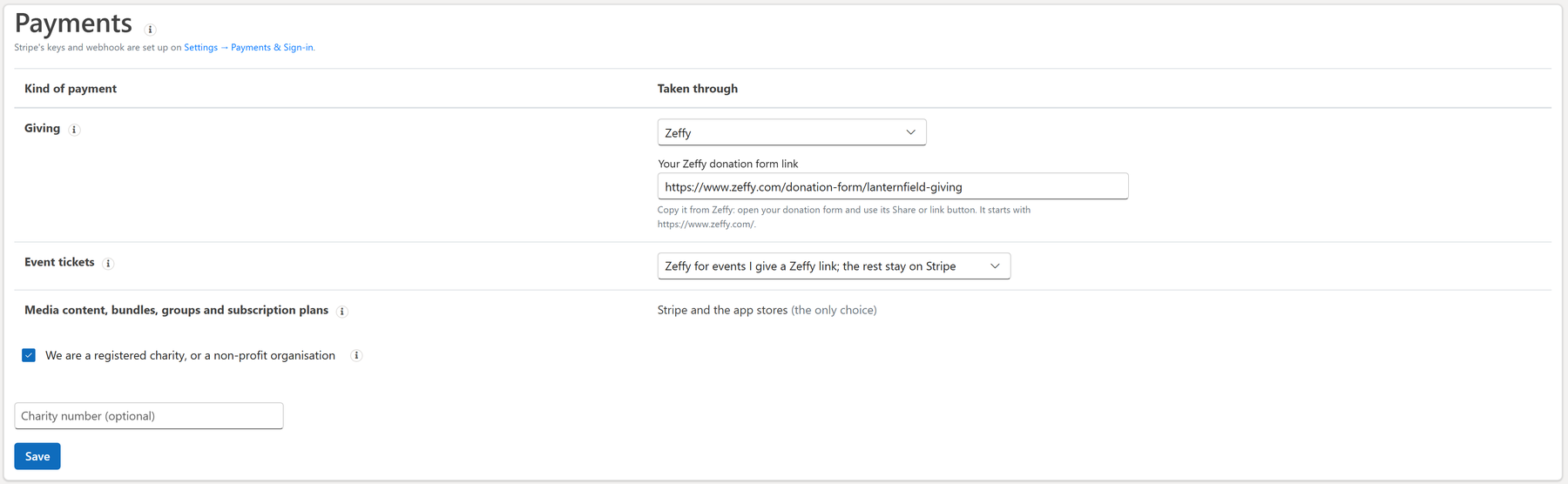
| Giving | Stripe (default) or Zeffy, for the whole giving page |
| Event tickets | Stripe (default), or Zeffy for each event you give a Zeffy ticket link. Events without one stay on Stripe. |
| Media content, bundles, groups and subscription plans | Stripe and the app stores only |
Subscription plans and groups stay on Stripe because Zeffy never tells us a membership has stopped, so access could not be taken away. Digital content inside the apps has to use the app stores' own billing.
Set up giving
- In Zeffy, make a donation form for your organisation and copy its link (it starts with
https://www.zeffy.com/). - In the portal, open Set-up → Settings → Payment provider, set Giving to Zeffy, paste the link, and confirm your organisation is a charity or non-profit.
- Press Save, then connect Zeffy so gifts are recorded.
Take one event through Zeffy
- On the same page, set Event tickets to Zeffy for events I give a Zeffy link and save.
- In Zeffy, make a ticket form for that event and set the same capacity there. Copy its link.
- Under Events taken through Zeffy, paste the link next to the event and press Save.

From then on, signing up for that event holds the person's place in your app (for the usual short time) and hands them to Zeffy to pay. Remove the link and the event goes back to Stripe.
Promo codes, price rules and gifted tickets belong to Stripe. A Zeffy ticket form has its own prices and the person buys for themselves.
Connect Zeffy so payments are recorded
Zeffy takes the payment, then tells us. You set up that notice once:
- In Zeffy, open Settings → Integrations and make a Webhook connection.
- Paste the address shown under Tell Zeffy to let us know in the portal. It contains a secret, so treat it like a password. Make a new address replaces it if it is ever shared by accident.
- Optional: make an API connection in Zeffy and paste its key into the portal. Check Zeffy now then looks at the last 45 days of Zeffy's list and records anything the notice missed.
How a payment is matched
- A payment through your giving form is recorded as a gift, from the person's name and email, and shows in Giving with the method Zeffy. If the email belongs to a member, it is on their giving record.
- A payment through an event's ticket form confirms the waiting sign-up with the same email. The ticket and its QR code are made and emailed as for Stripe.
- Only your amount is recorded, never the tip. A payment is never matched by amount, because the tip makes the total unpredictable.
- Anything not clear waits under Zeffy payments → Needs you, with what Zeffy sent beside it.
When a payment is waiting for you
| You see | Do this |
|---|---|
| A gift whose amount couldn't be read with certainty | Record as gift and check the amount (without Zeffy's tip). |
| A ticket payment with no waiting sign-up for that email | Link to sign-up and choose the event and the person. If they never signed up here, add the sign-up first. |
| "Not sure which" | Say whether it was a gift (Record as gift), link it to a sign-up, or Set aside. |
The first time you record a gift by hand, your app remembers the form it came through, so the next one through it is recorded without asking.
Refunds
Refunds are made in Zeffy; we can't make them for you. When you cancel a Zeffy-paid sign-up, your app says so and offers Cancel, mark as refunded: do the refund in Zeffy first, then press it so the place, the sign-up and your totals say so.
In your totals
- Giving and Sign-ups and giving show Zeffy gifts with a fee of nothing (No fee (Zeffy)) and no Gift Aid from your app.
- The Sign-ups page says paid through Zeffy on those tickets.
If something doesn't show up
- Nothing arrives from Zeffy: the page says when the last notice came. If it never has, check the address in Zeffy's webhook connection is exactly the one in the portal.
- The address stopped working: if you pressed Make a new address, paste the new one into Zeffy.
- A payment is in the list but not recorded: open What Zeffy sent to see the notice as it arrived, then record it by hand.