

 Heartisan Studio
Nobody getsforgottenon a clipboard.
A newcomer fills in a form. A volunteer rings them. A week later they join a group and the card moves on by itself. A follow-up board is a row of stages with a card for every person you are looking after, so the call that should happen actually does.
- "I'm new here" form sentA card appears in New
- A volunteer picks it upFrom their phone, in one tap
- Call logged: voicemailTry again in 2 days
- Two days later
- They join a groupThe card moves to Connecting by itself
- Settled inDone, and counted in the weekly report
One card, start to finish. Every change is written to its history, against a named person.
"Someone should call them."
The most expensive sentence in any organisation is one that ends with "should". It means nobody has it.
How it usually goes
- The form answers sit in an inbox until someone has a spare evening
- Two people each think the other rang
- Nobody can say how many newcomers are still waiting for a first contact
- The person who kept the list is away, and so is the list
- You find out a month later that it quietly stopped happening
With a board
- The card exists the moment the form is sent
- Every card has a named person, or says plainly that nobody has it yet
- A card that stays too long in a stage tells someone
- The history stays with the card, whoever picks it up next
- A weekly note tells the owner how it did, without anyone asking
Cards arrive by themselves.
Nobody types a newcomer into a list. A card is made from wherever the person first showed up, and someone already on the board gets their existing card added to, never a second one.
- A form is sent
- A connect card, a prayer request or a volunteer interest form puts a card on the board and stage you chose.
- An automation
- A Flow step creates the card, with an owner and a starting stage.
- A first-time family at the door
- One card for the whole family when they register themselves at the check-in kiosk, with the household and children already set up for check-in.
- A QR code on paper
- Print a form's code on a connect card. Scanning it opens the form, and the form puts the person on the right board.
- By hand
- Pick the person, pick the board, add the card.
- Templates to start from
- New visitors, getting started, volunteer onboarding, membership, care and welfare, requests and room requests.
Worked from a phone, in the moment.
Volunteers don't need a dashboard login. Being a member of a board is what lets them see its cards, and they work them from the app.
- Pick up or pass on
- Take a card nobody has, or hand it to someone else.
- Log a call
- Reached them, voicemail or no answer, with "try again in N days" so it comes back by itself.
- Contact in one tap
- Call, text, WhatsApp or email, from the card.
- A checklist per stage
- What good looks like at each step, ticked one item at a time.
- Notes, private if needed
- Keep a note to the team only, away from anyone else working the card.
- Replies come to the card
- When someone answers a text or a WhatsApp message the board sent, it lands on their card and whoever has it is told. Staff reply on the channel the person used.
Cards that move on by themselves.
Dragging a card is for human decisions. The rest is a rule: when they do this, move to that stage, and write down why.
- Join a group or a team
- Any, or a particular one. The card's history reads "Joined Tuesday Group, moved to In a group".
- Sign up, check in, turn up
- An event sign-up, a check-in or being marked present moves it on.
- Give, get the app, answer a form
- A first gift, installing the app or sending a form.
- Watch, or fall behind
- Watch something you published, or finish or fall behind a daily series.
- A stage that starts an automation
- Arriving at a stage can send a welcome, wait a few days and tag the person, and the wait stops if the card moves on.
- The best channel, once
- One message to the first channel that works: the app, then WhatsApp, then a text, then email. Anyone who has opted out of one is skipped.
A rule only reacts to things that happen after the card began, and fires once per card, so an old gift never moves a new card.
See what is happening, not just what is due.
Every stage has a target number of days. A card that has been there longer is late, and the right people are told once, not nagged.
- Tell the person looking after it, straight away
- Tell the board's owner after a number of hours you choose
- Tell a whole team after a different number of hours
- A report per board: new, finished and closed over any period from the last 7 days to the last year
- Where cards are in each stage, and how long they stay there on average
- Who has what, how many are late, and how many each person finished
- A short note to the owner every Monday, by app notification and email
The report never shows notes, replies or what anyone watched.

Show people where they are.
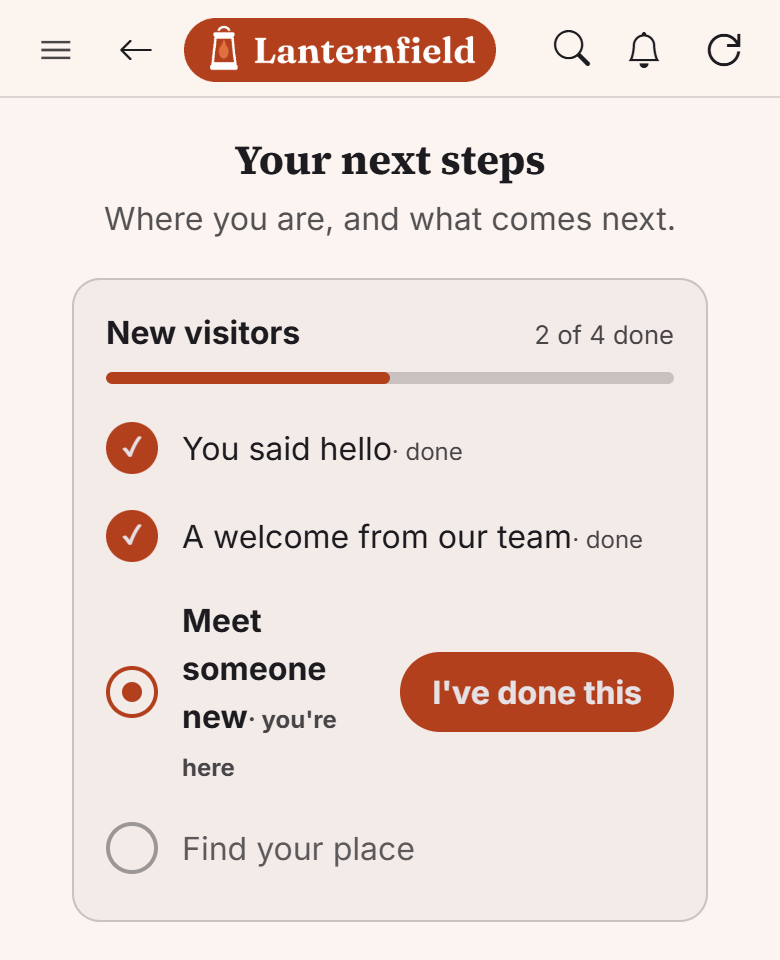
A board can be shown to the people on it. They get a short checklist of their own, in the app or on any page, with the step they are on marked, and a button when a step is theirs to tick.
- Their words, not yours
- Each stage has a step name for the person, such as "Meet someone new". A stage with no step name is never shown.
- "I've done this"
- When a step is theirs to tick, pressing it moves their card on, writes it in the history under their name and tells whoever looks after the card.
- Nothing they shouldn't see
- They never see your stage names, notes, checklists or who has their card, and a confidential board is never shown at all.
The specifics.
- Boards
- As many as you need, each a journey of its own: new visitors, volunteer onboarding, a care list, room requests. A name, a colour and a description.
- Stages
- Each is Working, Done or Closed, with its own colour, a target number of days, a checklist and an optional automation that runs when a card arrives.
- Who looks after new cards
- Nobody in particular, one fixed person, in turn across a team, or whoever on the team has the fewest open.
- Board members
- People, a team or a group. They choose what members may do: see every card or only their own, pick one up, pass one on, and whether they are told about new ones.
- Confidential boards
- Only members and managers ever see the cards. Marked with a padlock.
- On the page
- A board or a list, search across title, contact and assignee, and quick filters for your own cards, unassigned, overdue and stuck.
- What was done since
- Each card shows the groups and events joined, attendance, daily series progress and whether they have the app. What someone watched is off unless an administrator switches it on for that board.
- Closing
- Moving a card to a finished stage asks how it ended, and the answer is kept for the report.
- Privacy
- The person's own view never shows your notes, checklists or who has their card, and they are matched by their profile or account email, never by name.
- Access
- Staff work boards in the portal from Content Manager up. Volunteers need no portal login at all.