How it works
Pricing
About
Help centre
Contact
Book a demo Log in

One app yourwhole churchwill actually use.

Talks and live streams, giving, groups, rotas, check-in, forms and the Sunday service plan, under your church's own name in the app stores, and working in a hall with one bar of signal.

Try Lanternfield's app in your browser

Lanternfield is a church we made up. Everything on its screens is the real Heartisan. Pick a screen and stand where its owner stands.

Your church's own app, on their own phone.

Jordan, in the foyer before the service.

Under your name
Published as your church in the App Store and on Google Play, with your icon, colours and words.
What's next comes first
A welcome by name, the next event, and a way in for newcomers, children's work, groups and giving.
Works on one bar of signal
Talks download, and forms queue and send themselves when the signal comes back.

Open the phone and the rota spreads out.

On the welcome desk, checking next Sunday.

Re-laid on the spot
Open or close a Galaxy Z Fold or another folding Android phone and pages spread into columns on the inner screen.
Built for iPhone Duo too
There the quick-links bar moves to the side when the phone is opened out.
Confirm, swap or say you can't
The rota in a pocket, without a phone call.

The service plan, live at the front.

At the front, running the Sunday Gathering.

On now, and what's next
Each segment with its time, who is leading and the clock, as it runs.
Planned against actual
The times you planned beside the times it really happened.
ProPresenter in step
Decks attached to the plan can be sent to the ProPresenter computer.

Mix the stream at the sound desk.

Heartisan Studio, on the church's own laptop.

The channels you want
Take channels from one sound card or several, each with its own level and pan.
See it and hear it first
A meter on every channel, and a listen to the mix before it goes out.
Saved for next Sunday
Name a mix once, then choose it when you go live.

The foyer screen comes included.

On the foyer wall, on an ordinary TV.

No fee per screen
Lobby Screens is part of your Heartisan plan, with no add-on.
ProPresenter, PowerPoint, PDF or pictures
Every slide becomes a picture you check before it is used.
Steered from a phone
Back, hold and forward from the portal, or shows scheduled on a calendar.

The slides on this screen are samples we drew. Yours are whatever deck you send it.

Sunday, on the TV at home.

A family across town, watching live.

The same app, laid out for a remote
On Google TV, Android TV and Fire TV, with your own sections down a side menu.
Sign in with a code
A code from a phone, so nobody types a password with a remote.
Live now, first
When a broadcast is on, it leads the TV's home screen.

One portal behind every screen.

In the church office, on a Tuesday.

One place to run it
Publishing, people, giving, events and messages, in one portal you control.
One record per person
Rotas, giving, groups and sign-ups all tie back to the same person.
Change it once
Branding, wording and feature switches reach every app through sync.

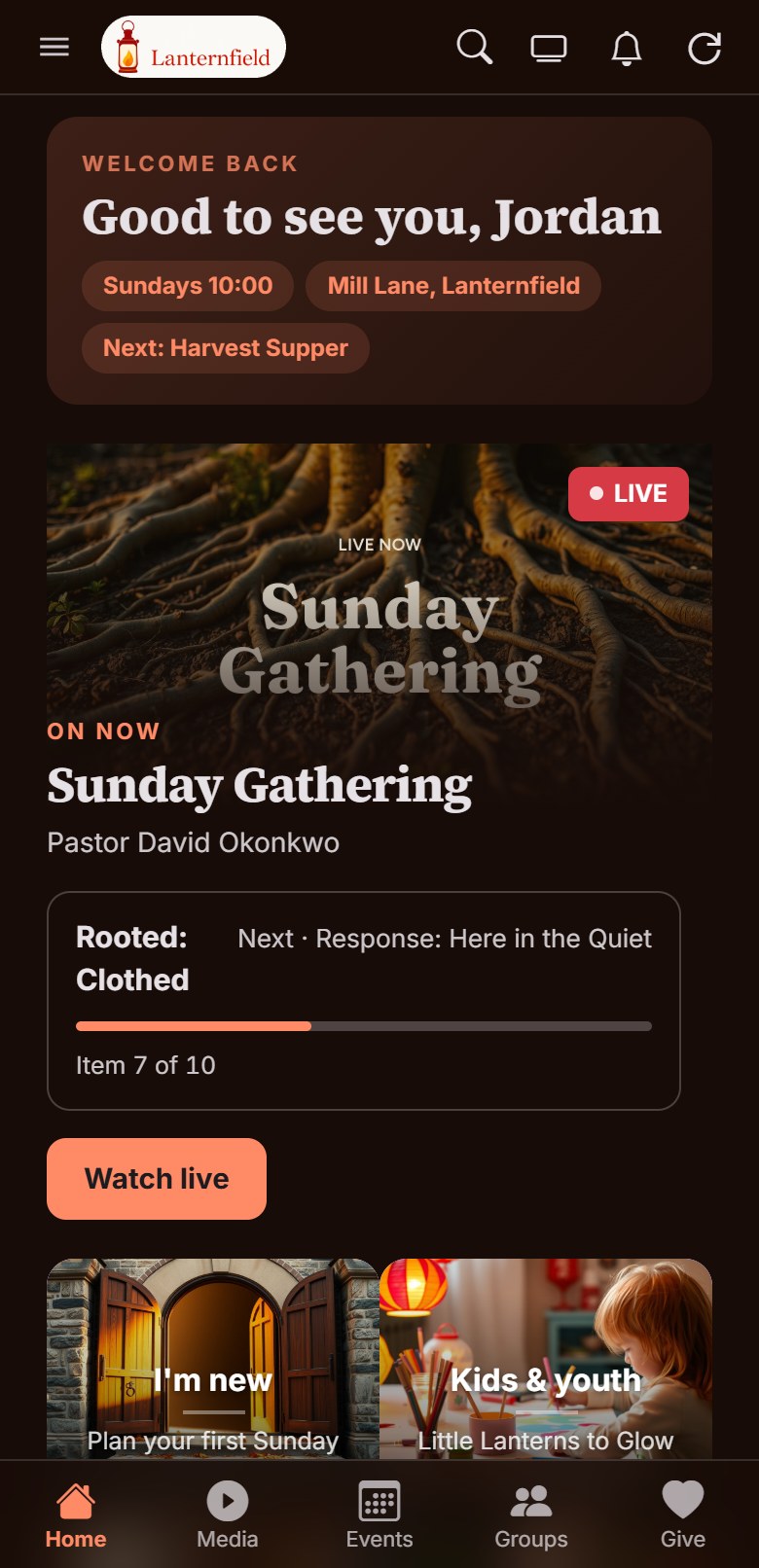
The Lanternfield app's home screen on a Sunday: a welcome by name, the Sunday Gathering live now with where it has reached in the service plan, a Watch live button, and picture tiles for newcomers and children's work
The app. Lanternfield's home screen on a member's phone.
The rota on a folding phone: one column of Sundays on the closed phone, two columns once it is opened out
A folding phone. The rota closed, and opened out into two columns.
The Sunday Gathering service plan running live on a tablet: the segment on now with its clock, and every segment's planned and actual time
The service plan. Sunday Gathering running live on a tablet.
Heartisan Studio's channel mixer: eight channels from the sound desk named Pastor, Lectern, Worship, Vocals, Guitar, Keys, Drums and Room, each with a meter, a level and a pan, the camera's sound beside them, and the meters of the finished mix
Heartisan Studio. The channel mixer, with a mix saved as Sunday stream. The sound here is a test tone.
The Lobby screens page in the portal: three named screens, the foyer screen showing a slide with Back, Hold here and Forward buttons
The foyer screen. The portal page that steers it: back, hold and forward.
The Lanternfield app on a TV: the Sunday Gathering live now with a Watch live button, and the coming events beneath
The TV at home. Lanternfield's app on a TV, with Sunday live.
The portal's home page for Lanternfield: what is waiting, what is next up, the latest content, what is coming up and this week's figures
The portal. Its home page: what is waiting, what is next, and this week.

A real church on Heartisan.

Potter's House South London, on a member's phone. See their app, live

A Sunday service playing in the phchurch app, with the preacher's words following along in the transcript
Sunday, with the wordsA service playing, the preacher's words following along in the transcript.
The phchurch app's home screen: a revival night coming up, quick links to ask for help and share a story, and the events after it
HomeA revival night coming up, quick links to ask for help and share a story, and the events after it.
The phchurch app's music: songs recently performed on a Sunday, clipped from the services, and every song from A to Z
MusicSongs recently performed on a Sunday, clipped from the services, and every song from A to Z.

Inside Lanternfield's app.

Lanternfield is invented: its people, pictures and words are ours. Everything else is the app your church gets, in its colours, on a member's phone.

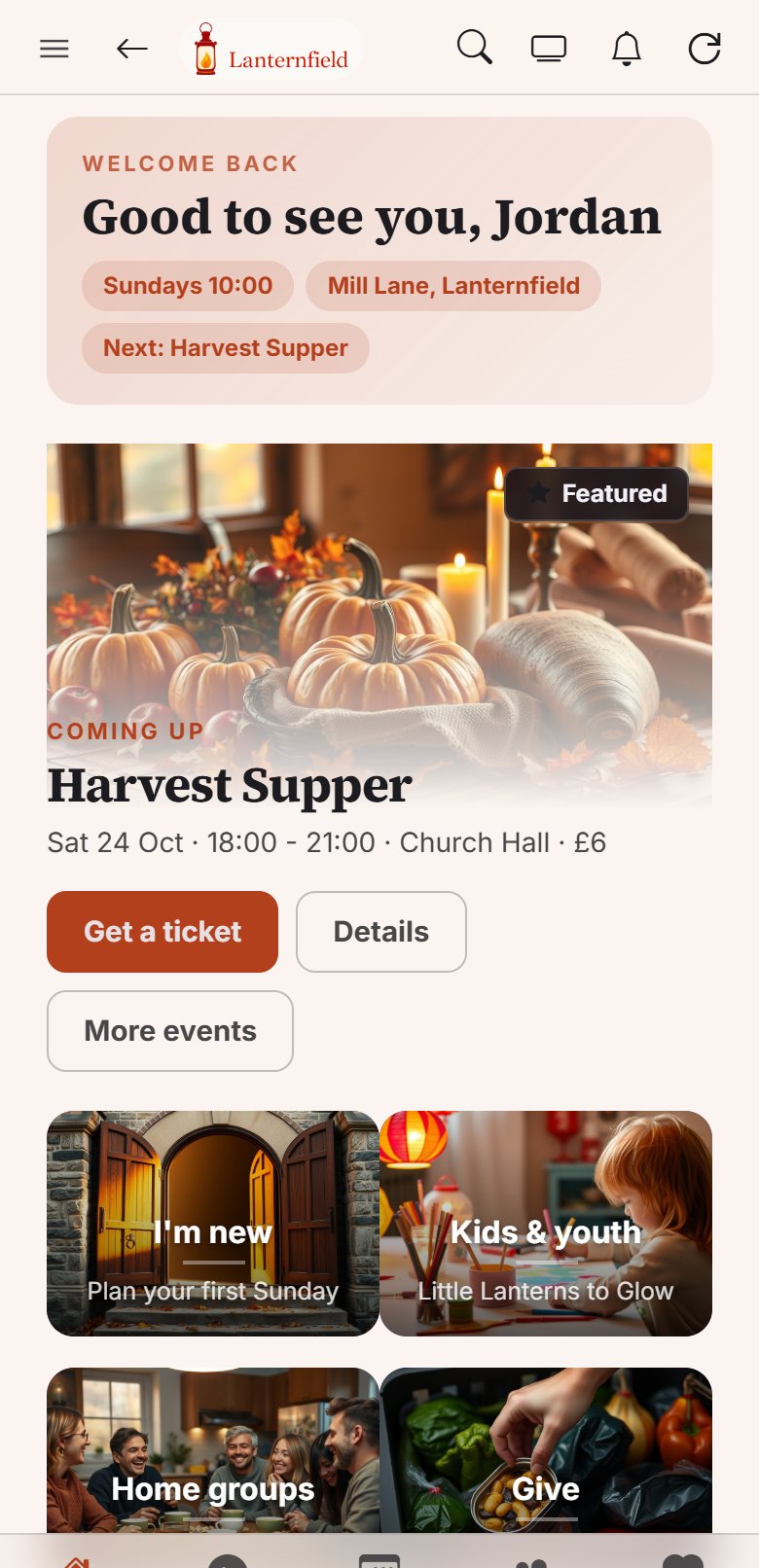
The Lanternfield app's home screen: a welcome by name, the Harvest Supper coming up, and picture tiles for newcomers, kids, home groups and giving
HomeA welcome by name, what's next, and a way in for every kind of visitor.
A page the church built itself, Plan your visit: a welcome picture, the practical details for a first Sunday and what to expect
Pages you build yourselfPlan your visit, laid out in the page builder and linked from home.
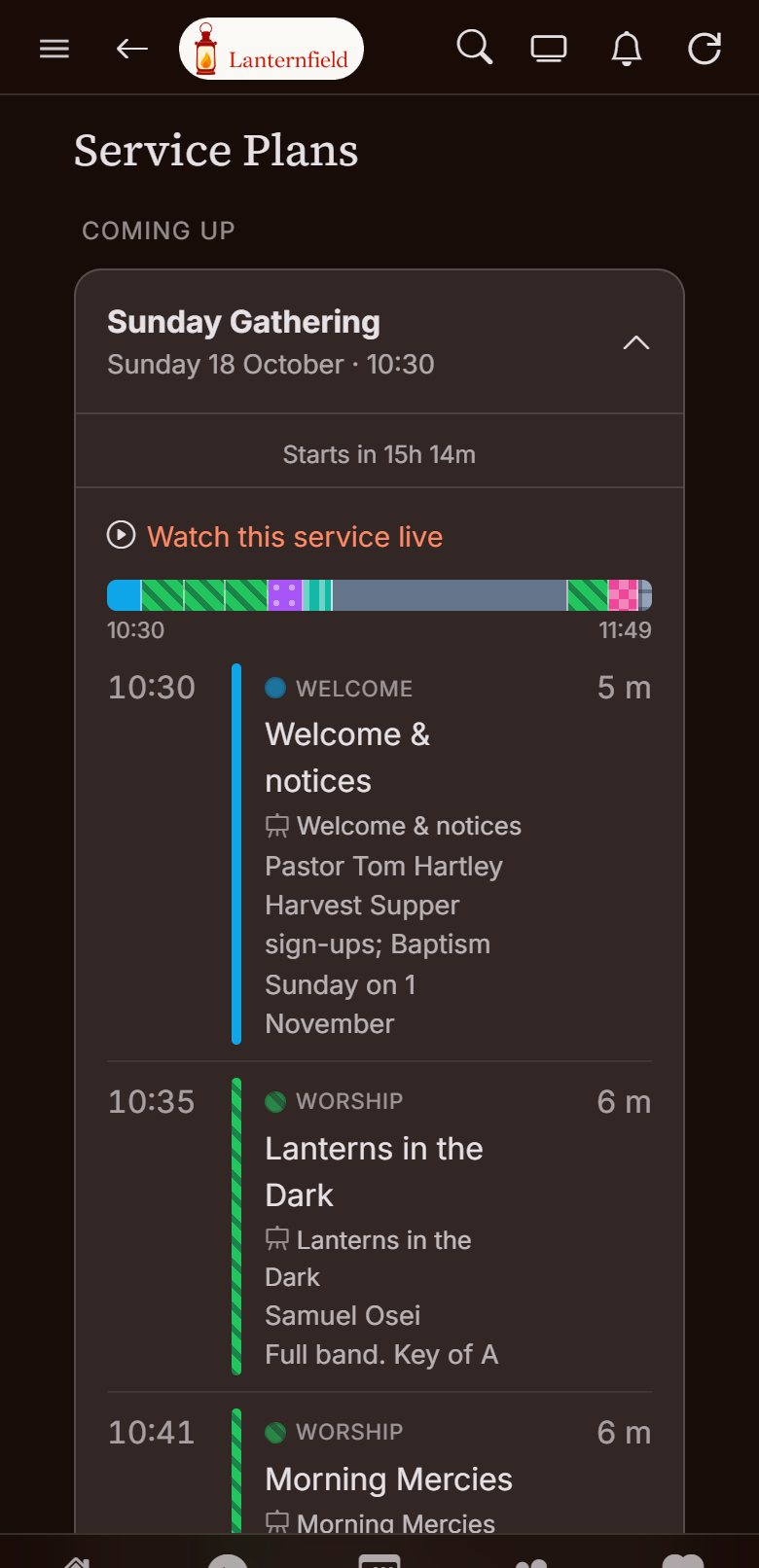
Sunday's service plan: each segment with its time, length, who's leading and notes
Sunday's service planEveryone serving sees the order, their part and the clock.
A member's rota: the Sundays they're serving, with confirm, can't make it and swap
The rota, in their pocketConfirm, swap or say you can't, without a phone call.
Events: the Harvest Supper and Carols by Candlelight featured, then the weekly prayer meeting
What's onSign-ups and tickets, with the featured ones first.
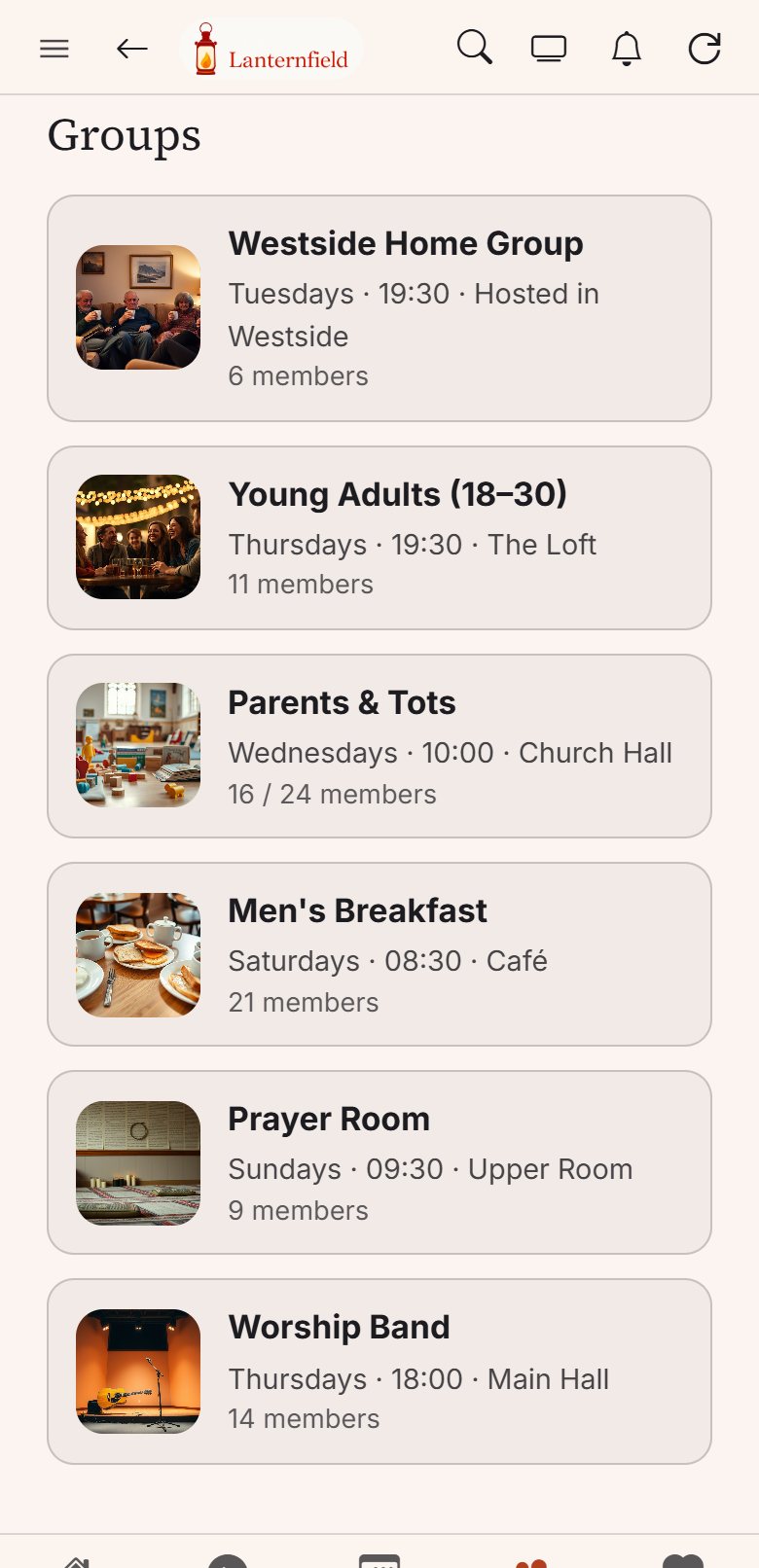
Small groups with where and when they meet and how many are in each
Groups to joinWhen, where, and room for one more.
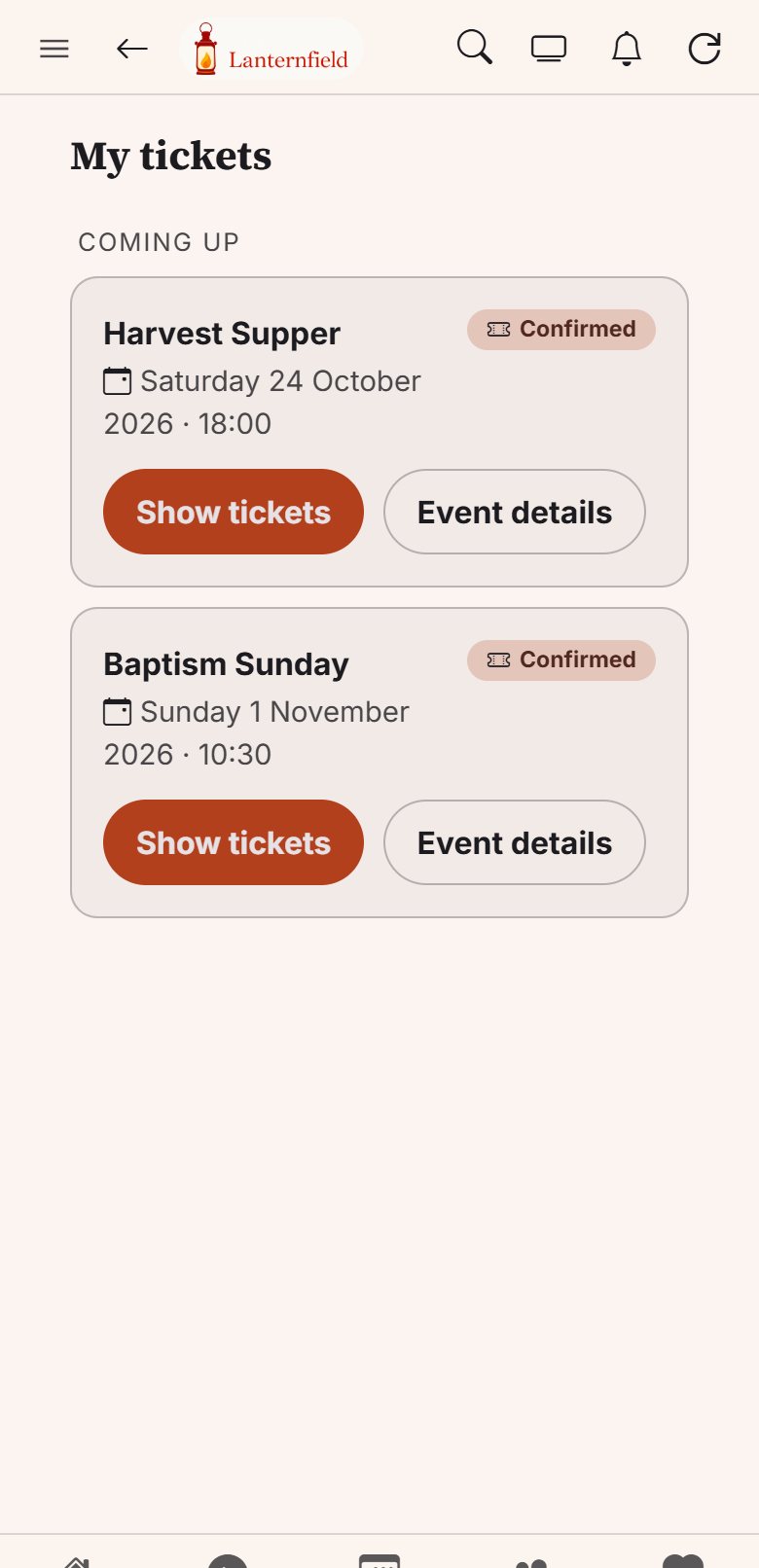
My tickets: the Harvest Supper and Baptism Sunday, each confirmed, with a button to show the ticket at the door
Tickets in the pocketEvery booking in one place, with its QR code for the door.
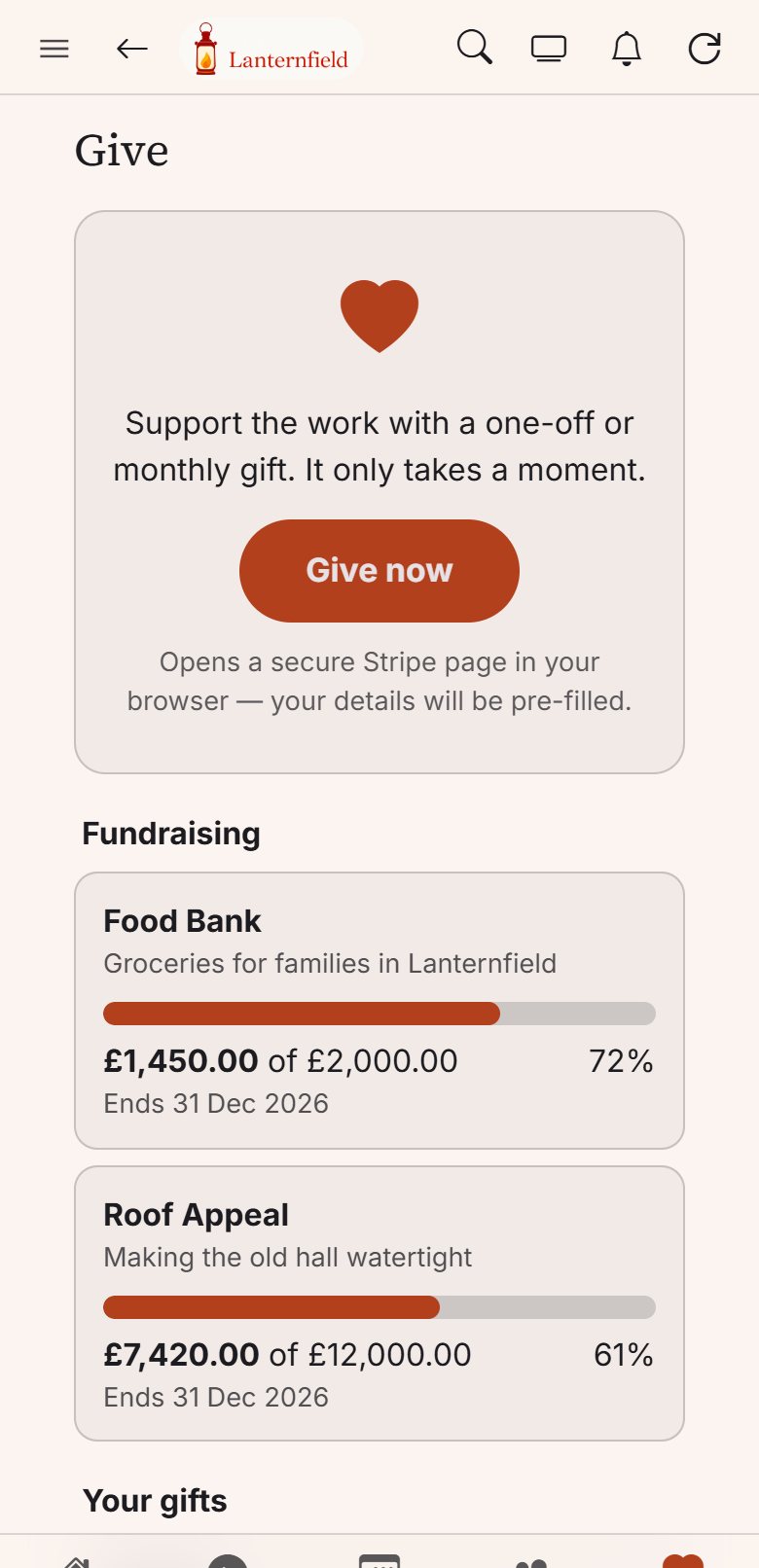
Give: the Food Bank appeal at 72 percent of its goal and the Roof Appeal at 61 percent, each with a progress bar
Giving with goalsA progress bar for each appeal, and a thank-you in your words.
Clips: three short cuts from Sunday talks, each linked back to the whole talk
Clips from the talkA short cut to share, with the whole talk one tap away.

Now use it.

Lanternfield's real app and portal, right here. Book the breakfast with a promo code, give to the food bank and watch its goal move, or fill in the welcome form, then open the portal and see it arrive. Nothing you type leaves your browser.

Opening FieldnotesThe first visit takes a few seconds.

The app and portal are real; the organisations, the people and the content are made up. The clips are short, and their footage and voices are computer-made. The portal is saved pages of the real one: they look and move like it, but only a few buttons do anything. Buying and giving open a pretend checkout, and what you do is kept in this browser only.

The problem isn't software. It's five pieces of software.

What most churches run

  • A management system nobody outside the office logs into
  • Talks on YouTube and a podcast host, with two back catalogues
  • Giving through a separate provider, reconciled by hand
  • Rotas in a spreadsheet and reminders in a WhatsApp group
  • A website that's out of date because updating it is somebody's third job
  • And a congregation who use none of it

What one platform gives you

  • An app with your church's name on it that people actually install
  • Talks, live stream and archive in one place, offline too
  • Giving in the app, into your own Stripe account, with statements
  • Rotas people accept on their phone, with reminders that send themselves
  • A website that updates itself from the same data
  • One record per person that ties it all together

Tuesday to Sunday, in one app.

  1. Tue

    The plan goes up

    Sunday's service plan is built in the portal, or on the phone of whoever is building it: items, timings, as many songs and presentations as each part needs, with arrangements and keys, who's doing what, and the camera plan and cues for the team alone. Rota requests reach phones the moment it's saved, with the time they're needed and the service plan one tap away. Planned in ChurchSuite? Paste the link and it comes across, songs and all.

  2. Wed

    A new face

    Someone fills in "I'm new here" on the website. A welcome email goes straight away, a task lands with the welcome team, and the follow-up is already running.

  3. Thu

    The band rehearses

    The keys player opens the app in a basement with no signal, and the set list, charts and rehearsal tracks are all there.

  4. Fri

    Two people haven't replied

    They're asked again automatically. Send it on WhatsApp and you can see it was read. The team leader is warned that Sunday's door slot is still empty, while there's time.

  5. Sat

    Nobody rebuilds the slides

    The plan goes to ProPresenter. You see the playlist before it's sent, and it appears on the auditorium machine in order, using the presentations you already had. Change the plan on Saturday night and ProPresenter's copy follows.

  6. Sun

    Everything at once

    Children checked in on arrival. The stream goes live and pins itself to the app and the website. Giving happens in the room. The plan highlights whatever slide is on screen.

  7. Sun pm

    Published before the volunteers go home

    The recording is transcribed and encoded, and goes out to the app, the podcast feed and the website with a searchable transcript nobody typed.

  8. Mon

    You can see what happened

    Attendance, giving, plays, new people and forms on one dashboard, without exporting anything.

Everything you'd otherwise buy separately.

Talks and live stream
The archive, the series, the podcast and Sunday's stream in one library that works offline.
Scripture
Every Bible reference in the app, down to the notes on Sunday's service plan, opens the passage, in your church's translation or the member's favourite, with the talks and events on the same verses beneath it.
Giving
One-off and regular giving across several funds, Gift Aid-ready records, statements your treasurer will accept.
Groups and check-in
Groups people can find and join, children's check-in with a record, attendance that isn't a guess.
Planning
Service plans, the song library with CCLI-ready usage, team rotas, and ProPresenter on the day.
Welcome and follow-up
The new-person journey, the first-gift thank-you and the gentle nudge, running by themselves, and follow-up boards so every newcomer has a named person and a card that tells someone when it is late.
Your website
What's on, the latest talks and the give button, on your existing site and never out of date.

Church buildings eat mobile signal

Thick walls, basements, halls, car parks in the middle of nowhere. Everything members use reads from a copy on the phone, and anything done offline is sent when they're back: downloading a talk, filling in a form, checking the rota, looking up the set list.

Your congregation's data stays theirs

People's records are fetched for that person when they're signed in, and never bundled into what syncs to everyone's device. One member's phone can never hold another member's details, giving or notes, because that data never travels that way.

How the people side works

What churches ask.

Do we need our own Apple and Google developer accounts?

Not necessarily. Publish under your church's own accounts if you want the listing, reviews and ownership fully in your hands, and we'll set them up with you and handle submissions. Or we host it under our accounts, still branded as your church, and you can move later. On the hosted route we ask that your content plays by the stores' rules, since the account is shared.

We already use a church management system. Can we move?

Usually, yes. People, groups and giving history can be imported. Tell us what you're on and we'll say honestly what will and won't come across cleanly.

Our church lives on WhatsApp. Can you send there?

Yes, on your own WhatsApp Business number, beside push, email and text. A message sent on WhatsApp and SMS doesn't arrive twice, and WhatsApp is the only channel that tells you a message was read. Replies come back into Conversations. You'll need your own Business number and templates approved by Meta; we walk you through it, and per-message charges go to them, not us.

Our year's events are in a spreadsheet. Do we retype them?

No. Import it as a CSV with the posters and every event arrives at once, as drafts if you prefer. A preview shows what's new, what changes and what has a problem. Import a corrected version later and the same events update rather than duplicate.

We plan services in ChurchSuite. Do we start again?

No. Paste a shared ChurchSuite plan link and the service plan is built from it: the parts in order, who is leading each, the notes, and the week's songs from your set list. When the plan changes in ChurchSuite, the same link shows what would change before you take it.

Does the giving come to us directly?

Yes. It runs through your own Stripe account and settles to you. We don't sit in the middle and we don't take a percentage.

We don't use ProPresenter. Is planning still useful?

Yes. Plans, the song library and rotas stand on their own; ProPresenter is an extra for churches that use it.

Half our congregation doesn't read English. Does that help?

Yes. A transcript can be written in other languages, and where a voice model exists the talk can be spoken in that language in a voice cloned from the speaker, with the room still audible and the worship left alone. People pick their language once and every recording starts in it. A few languages are licensed for non-commercial use only; the portal states the terms and you decide.

Can the app show the Bible in the NIV or ESV?

Not in full, on purpose. Those translations are copyrighted, and publishers allow quoting a few verses, not an app that can show any passage on request. The app reads nine public-domain translations itself (King James by default, and Spanish, French and German ones), and offers the NIV, ESV, NLT, NKJV and others as a link that opens the same passage in the Bible app.

We project the NKJV. Does the app show that?

No. A scripture slide in a recording's transcript, a live stream, a TV or a lobby screen keeps its reference and shows the same verses in your chosen public-domain translation, and the picture of the slide is left out. Your ProPresenter files and your own library are never changed. If ProPresenter sends a reference without its book number, such as "Peter 2:20", the app shows the reference alone rather than guess which letter.

Can our rota coordinator do this from their phone?

Yes: the whole builder, not a cut-down version. Plans, the calendar and messaging too. It's off until an administrator turns it on for that person.

Who runs it? We don't have a tech team.

We do. Provisioning, hosting, updates, store submissions and support are part of the subscription. You need someone who can upload content and answer emails, not a developer.

Can we use our own words?

Every module can be renamed. Say "gathering" rather than "service", or "team" rather than "group", and the app says it too, everywhere.

One platform.Your church's name on it.

We'll show you your own branding running in the app before you commit to anything.