How it works
Pricing
About
Help centre
Contact
Book a demo Log in

Teach it once.Sell itfor years.

Personal trainers, mentors, tutors and anyone with something to teach: sell your courses and programmes in an app with your name on it, run your classes and cohorts from it, and keep every client a message away.

Try this app, Ironbark, and two more in your browser

Ironbark is a personal trainer's business we made up. Everything on its screens is the real Heartisan. Pick a screen and stand where its owner stands.

Your coaching, as an app in their pocket.

A client at Saturday Park Bootcamp.

Your name on it
On the App Store and Google Play under your name, not inside a marketplace next to your competitors.
Sessions with places
Bootcamps, workshops and assessments, with sign-up and tickets.
One-to-one
Message a client in the app, and keep every answer in one place.

The session plan, on every coach's phone.

Jess, between circuits.

Everyone's part
Every coach sees the running order and their part.
Round by round
The warm-up, each circuit and each break, with its time and who leads it.
Planned against actual
The times you planned beside the times it really happened.

Teach it once. Sell it for years.

On the sofa, about to buy Strong in 12.

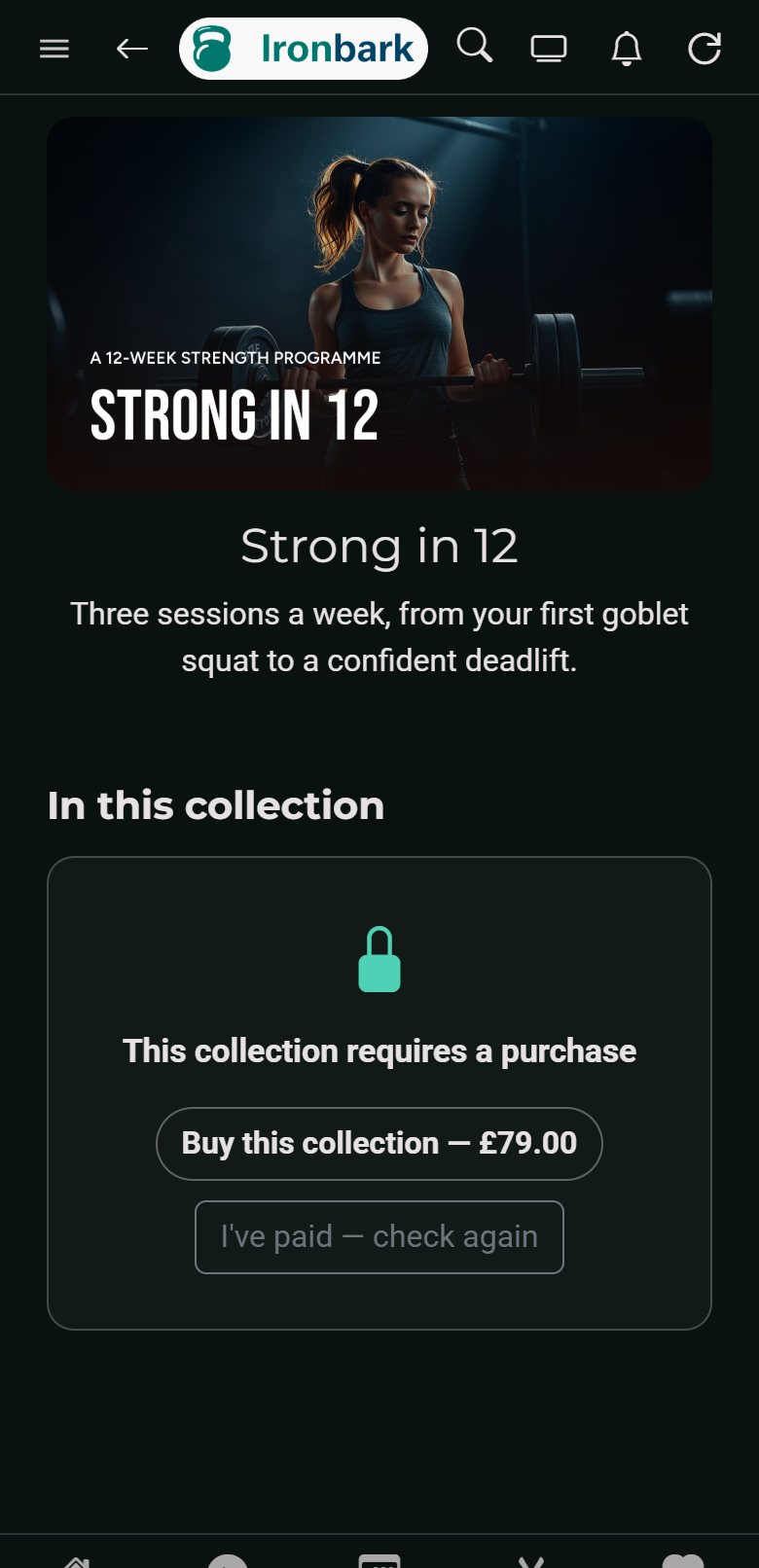
A programme for sale
Bought once, kept for good, in your own app.
Your price, your artwork
Sell it once, or put it inside a monthly membership.
Free tasters
Free taster lessons sit right beside it.

Ironbark, on the TV at home.

A client's front room.

The same app, laid out for a remote
On Google TV, Android TV and Fire TV, with your own sections down a side menu.
Sign in with a code
A code from a phone, so nobody types a password with a remote.
Live now, first
When a broadcast is on, it leads the TV's home screen.

And in a browser, for everyone else.

Someone who has not installed the app yet.

Live
Teach a class live in the app, and the recording goes into your library afterwards.
Captions on every lesson
Made on your machine.
Memberships
That unlock everything, monthly or yearly.

Mix the live class from your desk.

Jess, in Heartisan Studio at home.

The channels you want
Take channels from one sound card or several, each with its own level and pan.
See it and hear it first
A meter on every channel, and a listen to the mix before it goes out.
Saved for next Saturday
Name a mix once, then choose it when you go live.

One portal behind every screen.

On Jess's other screen.

One place to run it
Publishing, people, support, events and messages, in one portal you control.
What is waiting, and what is next
Its home page starts with the follow-ups still open and the next event.
This week, at a glance
Plays, active devices, support and form entries for the last seven days.

The Ironbark app's home screen: Saturday Park Bootcamp on now with where the session has reached, a Watch live button, and the next session
The app. Ironbark's home screen, with Saturday Park Bootcamp on now.
Session plans in the Ironbark app: the Saturday Park Bootcamps coming up, and last week's opened out round by round from the pulse raiser and mobility
The session plan. Saturday Park Bootcamp, round by round.
Strong in 12 in the Ironbark app: a twelve-week strength programme, three sessions a week, with a button to buy the collection for 79 pounds
A programme. Strong in 12, for sale in the app.
The Ironbark app on a TV: The Great Burpee-a-thon featured, with the sessions beneath
The TV at home. Ironbark's app on a TV.
The Ironbark member web app in a browser: its menu down the side, Saturday Park Bootcamp on now and the next session
In a browser. The member web app, at a laptop's size.
Heartisan Studio's channel mixer with Ironbark's mix: each channel with a meter, a level and a pan
Heartisan Studio's channel mixer. The sound here is a test tone.
The portal's home page for Ironbark: what is waiting, the next event, the latest content, what is coming up and this week's figures, with the menu down the side
The portal. Its home page: what is waiting, what is next, and this week.

Inside Ironbark: a personal trainer.

Jess sells a twelve-week strength programme, runs park bootcamps and squads, and checks her clients' form by message. Ironbark is invented; the app is real.

The Membership page: three plans side by side, with a coach in the gym
Pages you build yourselfYour plans and prices, laid out in the page builder and linked from home.
Strong in 12, a twelve-week strength programme, locked with a button to buy it
A programme for saleBought once, kept for good, in your own app.
Sessions: the autumn challenge and a charity burpee-a-thon featured, then the weekly park bootcamp
Sessions with placesBootcamps, workshops and assessments, with sign-up and tickets.
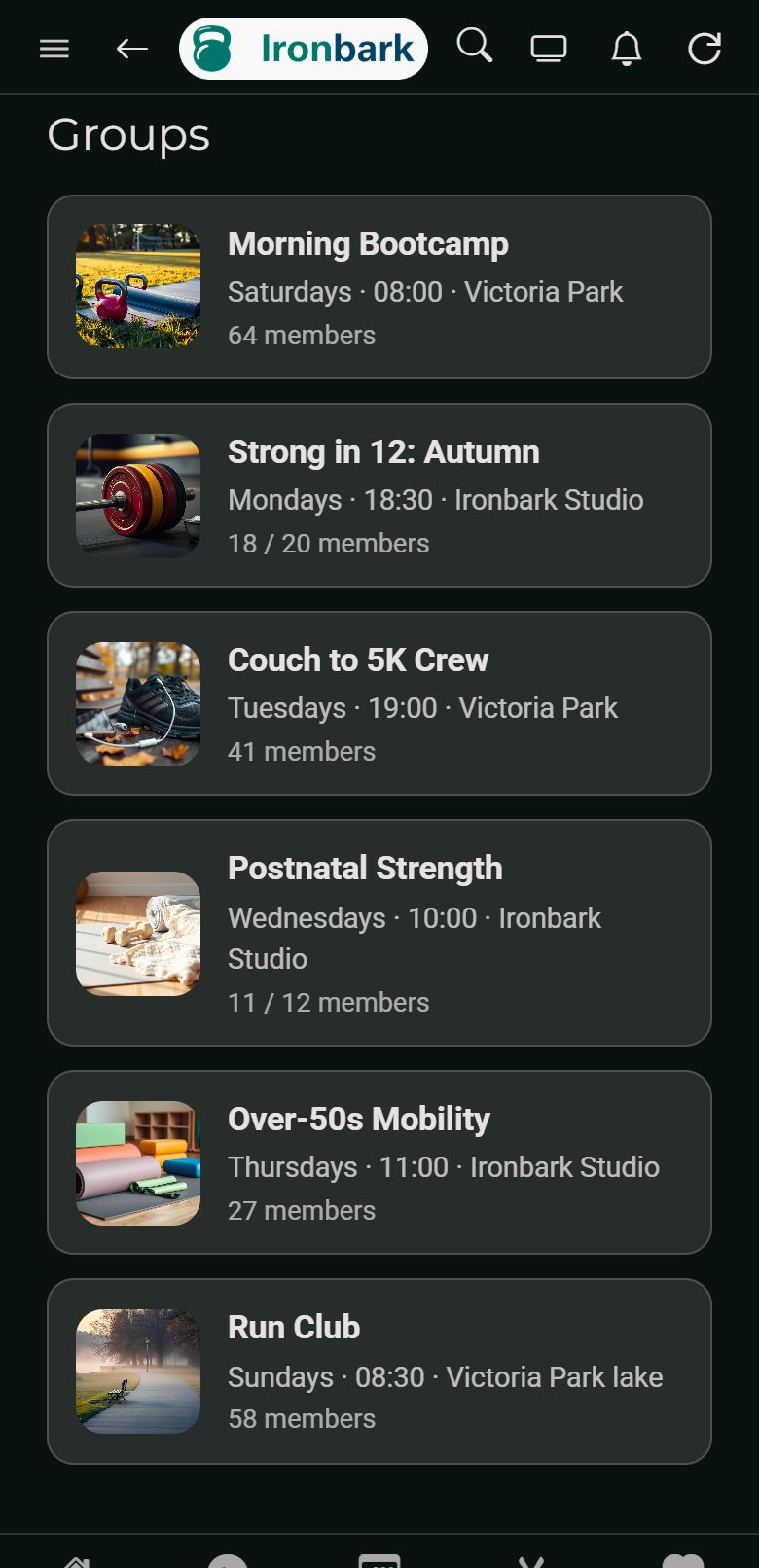
Squads: morning bootcamp, the strength cohort, couch to 5K, postnatal strength and more
SquadsEvery class and cohort, with its own chat and updates.
My tickets: the autumn six-week challenge and a strength assessment day, each confirmed, with a button to show the ticket
Prices that fitSquad, member and guest prices for one challenge, and promo codes for the rest.
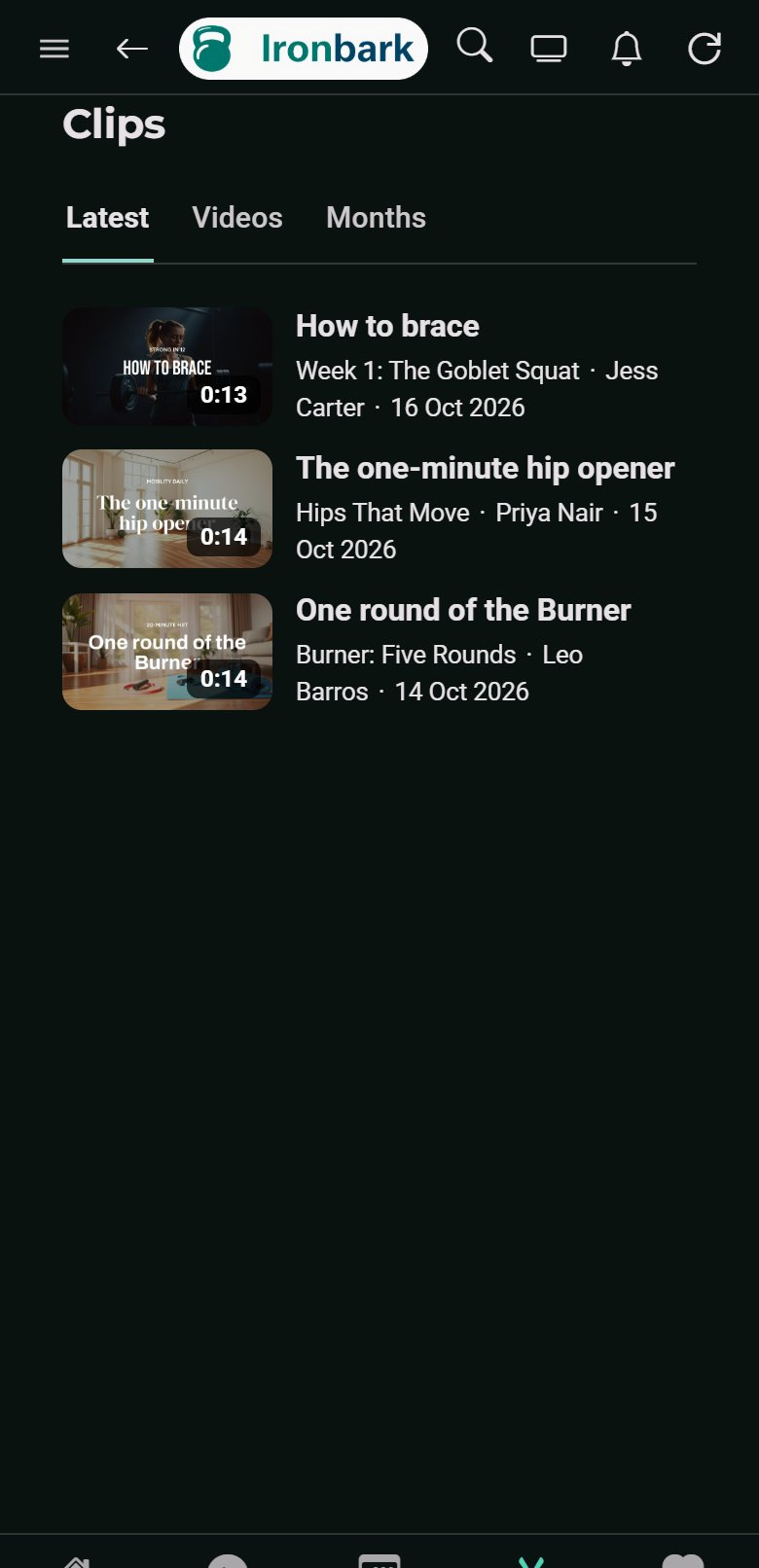
Clips: three short tips cut from longer workouts, on bracing, hip mobility and a burner round
Quick tipsOne round, one cue: short clips cut from the full workout.
Membership: a burpee-a-thon fund for the food bank at 63 percent of its goal, then the member's own payments
A challenge with a goalTen thousand burpees for the food bank, with the total in view.
The Saturday bootcamp's session plan: warm-up, two circuits, a finisher and a cool-down, with the coach for each
The session planEvery coach sees the running order and their part.

Inside Northstar: a mentoring network.

Northstar runs cohorts for founders and new managers, a weekly office hours call, and a finance course it sells on its own. Northstar is invented; the app is real.

The How it works page: the twelve-week programme as numbered steps
Pages you build yourselfHow the twelve weeks go, laid out in the page builder and linked from home.
Cohorts: the autumn founders cohort, a women in tech circle, first-time managers and career changers
CohortsClosed groups with a place limit, or open circles anyone can join.
Money Matters, a six-part finance course, locked with a button to buy it for £45
A course of its ownSold beside a free library of talks.
My tickets: the cohort kick-off and speed mentoring night, each confirmed, with a button to show the ticket
Events with the right priceAlumni and mentors in free, everyone else with a code.
Payments: a scholarship fund for free places at 63 percent of its goal
A scholarship fundFree places for people who can't pay, with a goal and a thank-you.
Clips: three short founder tips cut from longer sessions
A tip in fourteen secondsCut from the full session, linked back to it.
The office hours rota: who is duty mentor and who hosts the call each Thursday
Who's onMentors and hosts for every session, on a rota.
The form to apply for a mentor: where you are now, what help you want, and which cohort
ApplicationsA form in the app, and every answer in your dashboard.

Inside Brightwell: a tutoring centre.

Brightwell sells a GCSE maths course, runs small classes and mock exams, and keeps parents in the loop. Brightwell is invented; the app is real, and here it's a parent's view.

The Term dates and fees page: key dates and weekly prices for a parent
Pages you build yourselfTerm dates and fees, laid out in the page builder and linked from home.
GCSE Maths: The Complete Course, locked with a button to buy it for £39
A course, sold outrightYour price, your artwork, lessons unlocked on purchase.
Events: a mock exam morning and spring revision days featured, then homework club twice a week
Mocks and revision daysBooked and paid for in the app.
My tickets: a GCSE mock exam morning and an 11-plus taster session, each confirmed, with a button to show the ticket
Mocks with a sibling codeEnrolled pupils pay less, and a code takes a tenth off a second child.
Clips: three short lessons on quadratics, the mole and command words
A quick lessonOne idea in fourteen seconds, cut from the full lesson.
A tutor messaging a parent about how their son did in tonight's lesson
Parents in the loopA message from the tutor, not an email lost in a folder.
Fees: a bursary fund for free places at 49 percent of its goal, then termly tuition paid by card
FeesTermly tuition by card, through your own Stripe.

Now use one.

Ironbark, Northstar and Brightwell, real apps and portals, right here. Pick one, book something with a promo code, see your tickets, give toward a goal, then open the portal and see it arrive. Nothing you type leaves your browser.

Opening FieldnotesThe first visit takes a few seconds.

The app and portal are real; the organisations, the people and the content are made up. The clips are short, and their footage and voices are computer-made. The portal is saved pages of the real one: they look and move like it, but only a few buttons do anything. Buying and giving open a pretend checkout, and what you do is kept in this browser only.

A course platform, and everything around it.

Courses
Group your lessons into a course with its own artwork and price. Sell it once, or put it inside a monthly membership. Free taster lessons sit right beside it.
Classes and cohorts
Groups with a place limit, sign-up and their own messages: a twelve-week cohort, a Tuesday class, a squad that meets in the park.
Sessions
Workshops, mock exams, bootcamps and assessments in a calendar, with places and tickets.
One-to-one
Message a client in the app, send a form before their first session, and keep every answer in one place.
Live
Teach a class live in the app, and the recording goes into your library afterwards.
Your name on it
On the App Store and Google Play under your name, not inside a marketplace next to your competitors.

Recorded once, useful for years

Heartisan Studio runs on your own computer. It transcribes every lesson, names the speakers and lines your slides up with what was said, so every lesson has captions and a transcript.

  • Captions on every lesson, made on your machine
  • Translated captions and dubbed audio for other languages
  • Live lessons recorded straight into the library
Heartisan Studio

Paid the way you choose

Sell a course outright, run a monthly membership, charge for places at a session, or take termly fees. Card payments go through your own Stripe account; purchases in the phone apps use store billing, as Apple and Google require.

  • One-off prices for courses and programmes
  • Memberships that unlock everything, monthly or yearly
  • Codes for gifting access or running a launch offer
Monetisation

What people ask first.

Can I sell a single course, not a subscription?

Yes. Each course can have its own one-off price, and a member who buys it keeps it. You can also offer a membership that unlocks everything, and run both side by side.

I already have videos on YouTube. Do I start again?

No. Studio can bring in videos you already have, and your live streams can come from your YouTube channel and appear inside the app.

Is it only for fitness, mentoring and tutoring?

No. It suits anyone who teaches: music teachers, language schools, yoga studios, business coaches, trainers of trainers. Your app uses your words, so "squads", "cohorts" or "classes" are whatever you call them.

How is this different from a course marketplace?

A marketplace lists you beside everyone else and keeps the student relationship. Here the app, the list of students and the payments are yours, and a notification reaches the people who installed your app rather than a platform's feed.

What about children's data?

In a tutoring app the account usually belongs to the parent, as in the Brightwell demo. What you collect is up to you, and account deletion and data export are built in.

Your lessons.Your app.